
Contacts - Calls, Phone Dialer
Messages App EvolutionCommunication
4.5284.00 Reviews
- Version
- 2.0.21
- Installs
- 500.00K
- Age Rating
- Everyone
Screenshots
Our Review of Contacts - Calls, Phone Dialer
 Analysis by Appyee
I usually judge a contacts app by one simple question: does it help me reach the right person quickly, or does it make a basic task feel more complicated? Contacts - Calls, Phone Dialer takes that question seriously by bringing the address book, phone dialer, and call history into one communication-focused app. After using it as a daily phone tool, I found its main value is not flashy customization but the way it keeps the steps between finding a person and calling them relatively close together.
That focus makes it worth considering if your phone’s default contact screen feels scattered or if you prefer a dedicated place for people, numbers, and recent calls. It is a free app from Messages App Evolution, rated for Everyone, and its current version is 2.0.20. The app has reached over 500 thousand installs and holds a 4.2 average from around 3.1 thousand ratings, which suggests that its straightforward approach has found an audience without making it feel overloaded.
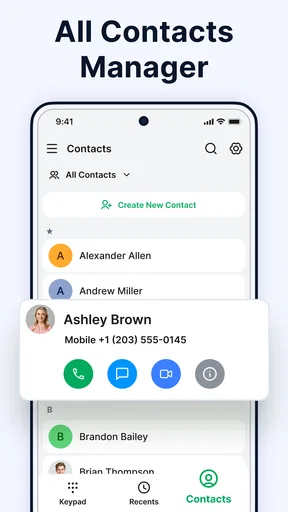
A contact list designed around the next call
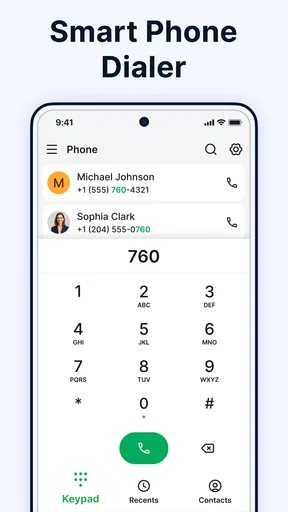
The most important capability here is the connection between the contact book and the phone dialer. Many phones already offer both, but they can feel like separate areas: one screen for saved people, another for recent calls, and a keypad that requires a different route. This app puts those everyday actions under one communication layer, so I can move from a person’s details to a call without treating the address book as merely a static list.
That sounds modest, but it changes how I use a contacts app during busy moments. If I am looking for a family member, a delivery driver, a colleague, or a local service number, I want recognition to happen before dialing. A contact name is more useful than a bare number, especially when several entries look similar. The app’s role is to make that transition from identity to action feel natural.
I also like that the design is centered on phone communication rather than trying to become a full messaging or social hub. The store summary describes contacts, phone dialing, call history, contact management, and the address book, and that description matches the practical purpose I experienced. It is best understood as a focused replacement or companion for the basic phone tools, not as an all-in-one communications platform.
One useful consequence of this approach is that it encourages me to clean up the way I store people. When contacts and calls are viewed together, duplicate or vague entries become more noticeable. A contact saved only as “Doctor” or “Work” may be enough when there are very few entries, but it becomes less helpful as the address book grows. The app makes the value of clear names and recognizable details more obvious because the next action is usually a call.
Finding people without losing the reason for the call
In practice, I use the contact area in two different ways. Sometimes I know exactly whom I need and want the shortest route to the call button. At other times, I begin with the call history because I remember that someone contacted me but not the person’s name. Having those two starting points available in the same app is more useful than it may sound.
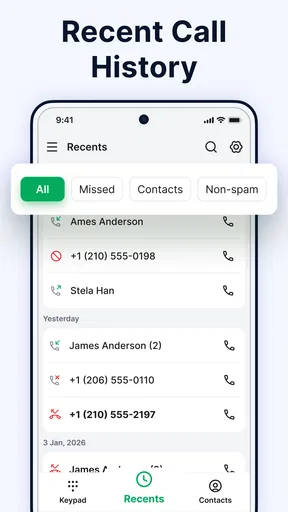
For example, imagine receiving a call while carrying groceries. I do not want to open several screens, copy a number, or wonder whether I am returning the correct person. I can look at the recent call entry, identify the saved contact, and call back from there. The practical benefit is reduced hesitation: the history provides context, while the address book provides identity.
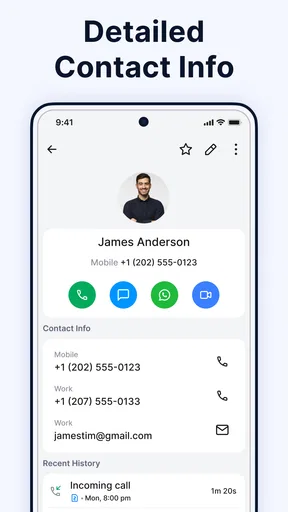
The reverse workflow matters too. If I open a contact first, I can treat the saved information as the source of truth instead of manually entering a number on the keypad. That reduces the chance of pressing a wrong digit, particularly when I am calling someone I rarely contact. This is one of the app’s less obvious strengths: it supports both memory-based navigation and name-based navigation instead of forcing every call through a single route.
I would still recommend taking a few minutes to review your address book before relying on it heavily. A contacts app can only be as clear as the entries it displays. If a person has multiple numbers, unclear labels can create a new problem at the exact moment you are trying to avoid one. My practical tip is to use names that make sense at a glance and to remove old entries that could be mistaken for current ones. The app becomes more useful as the contact list becomes more deliberate.
What the dialer adds to the experience
The dialer is not just a keypad placed beside the address book. Its real effect is that it gives me a direct manual option when I do not want to search for a saved person. This matters for numbers that are temporary, newly received, or not worth saving. I can enter the number directly, while the contact side remains available for people I call regularly.
That combination creates a sensible division of labor. Saved contacts are for recognition and repeat communication; the keypad is for one-off calls or numbers I have memorized. I do not have to decide in advance whether every number deserves a permanent place in my address book. This is especially convenient when calling a business, appointment line, or service provider that I may never contact again.
Call history completes the loop. I use it less as a record and more as a memory aid. It answers questions such as, “Who called me earlier?” or “Which number did I contact yesterday?” That makes it valuable in situations where the contact list alone is not enough. A person may be saved under a name, but the history tells me which interaction happened most recently.
My advice is to treat recent calls as a working queue rather than a permanent filing system. If an unfamiliar number becomes important, save it with a meaningful name. If it is irrelevant, do not let it become part of your mental address book simply because it appeared in the history. This small habit keeps the app’s central workflow clear and prevents recent activity from becoming visual clutter.
How it fits into an ordinary day
The best scenario for this app is a person who makes regular voice calls and wants fewer barriers between contacts and the phone function. I can picture it working particularly well for someone who keeps a large personal address book, calls relatives instead of relying only on messaging, or frequently moves between known contacts and unsaved numbers.
Consider a realistic morning. I need to call a family member, return a missed call from a contractor, and reach a clinic whose number is not saved. With a conventional setup, I might move between the contacts app, the recent-call screen, and the keypad. Here, the three tasks belong to the same general workflow. I can start with the named contact, use history for the contractor, and switch to manual dialing for the clinic. The advantage is not that any individual step is revolutionary; it is that the mental model stays consistent.
Another good use case is a shared household phone where different people depend on the same address book. Clear contact management becomes more important when the phone is not used by only one person. A recognizable list and an accessible call history can reduce the need to remember which number belongs to whom. I would still be careful with contact editing on a shared device, but the app’s communication-first layout suits this kind of practical use.
It may also help users who find feature-heavy phone replacements distracting. Some communication apps try to combine calling, texting, spam controls, backups, social discovery, and personalization in one package. Contacts - Calls, Phone Dialer takes a narrower route. If your priority is simply managing people and making calls, that restraint can feel refreshing. I spend less time deciding which feature to use and more time completing the task.
On the other hand, I would not choose it merely because you want an advanced messaging center. Its identity is the phone side of communication. Someone who primarily communicates through internet-based chats, video calls, or a platform-specific contact network may gain little from changing the standard setup. The app makes most sense when ordinary phone calls remain an important part of your routine.
Small habits that make the app more reliable
My first practical tip is to organize contacts around recognition, not just storage. When a call arrives or when I am searching quickly, the first few characters of a name and the distinction between multiple numbers matter more than having every possible detail. I would rather have a concise, clearly labeled entry than a crowded record that takes time to interpret.
Second, I use call history to decide which contacts deserve attention. If an unknown number appears repeatedly and turns out to be useful, saving it immediately turns future calls into a name-based action. If it is unwanted, leaving it unnamed prevents me from accidentally treating it as a trusted contact. This is a simple workflow, but it turns history into a tool for gradually improving the address book.
Third, I separate temporary dialing from permanent contact management. Not every number needs to be saved, and saving too much can make later searches slower. The dialer gives me a place for one-time calls, while the address book remains reserved for people and services I expect to recognize again. That distinction is especially helpful for users who regularly call businesses or short-term contacts.
Finally, I would test the app with the kinds of contacts I actually use before making it my only phone interface. Try a person with more than one number, a recent call from a saved contact, an unsaved number, and a contact that needs editing. Those situations reveal more than a quick look at the opening screen. A contact tool should be judged by how it handles your messy real-world list, not by how tidy an empty address book appears.
The tradeoffs behind the simple approach
The biggest tradeoff is that simplicity depends on what you expect from a phone app. I appreciate a focused contact-and-dialer experience, but users wanting extensive communication extras may find the boundaries limiting. A narrower tool can be easier to understand, yet it may not replace every part of a more expansive phone suite.
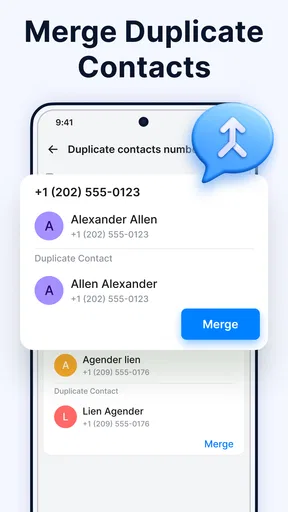
There is also a natural dependence on the quality of your contact data. If your address book contains duplicates, incomplete names, or outdated numbers, the app cannot magically determine which entry is correct. That is not a flaw unique to this product, but it becomes important because the app puts contact selection at the center of calling. The more often you rely on quick taps, the more valuable careful contact maintenance becomes.
Another point to consider is familiarity. The phone app already installed on a device may be deeply integrated into a person’s habits. Switching means learning where the dialer, history, and contact actions are located, even if the concepts themselves are familiar. I found the change worthwhile only when I wanted a more unified communication workflow. If the default tools already feel clear and fast, the reason to switch is weaker.
Privacy-conscious users should also make their own comfort assessment before handing any contacts app a central role. An address book is sensitive because it represents real people, not just numbers. I would read the app’s permission prompts and privacy information carefully, then decide whether its convenience justifies using it as the main interface. That is good practice with any contact manager, especially one intended to handle daily calling.
The age rating of Everyone makes the app broadly approachable, and the free price removes a financial barrier to trying it. Still, “free” should not be confused with universally suitable. The right choice depends on whether its focused calling workflow matches your habits. A person who rarely makes traditional calls may not notice much improvement, while a frequent caller can benefit from having the relevant tools together.
Compared with the usual alternatives
Compared with a phone’s built-in contacts and dialer, this app’s appeal is mainly organizational. The familiar default tools may be the better choice if you value deep device integration or do not want to change established habits. Contacts - Calls, Phone Dialer is more attractive when the standard arrangement feels fragmented and you want one app to represent the whole path from person to call.
Compared with messaging-centered communication apps, it serves a different purpose. Those alternatives are often stronger for text conversations, media sharing, group chats, or internet calling. This app is better when the important action is selecting a phone number and making or returning a conventional call. Choosing between them is less about which app is “best” and more about whether your communication starts with a contact record or a conversation thread.
Compared with a feature-rich third-party dialer, the tradeoff is likely to favor clarity over breadth. A specialized dialer may offer more ways to filter, customize, or identify calls, while this app’s value is its direct relationship between contacts, history, and dialing. I would select the broader alternative if advanced call handling is my main requirement. I would select this one if I want a cleaner everyday route to people I already know.
Who will get the most from it
I think the strongest audience is made up of practical phone users who still call often and want their address book to be useful at the moment of contact. It is a good fit for someone who alternates between saved contacts, recent callers, and manually entered numbers. It also suits people who prefer a dedicated communication app instead of treating contacts as a small feature hidden inside a larger phone interface.
It is less convincing for users whose lives are organized almost entirely around chat apps, video meetings, or web-based calling. It is also not the first choice for someone seeking a highly specialized call-management suite. In those cases, the default phone tools may be enough, or a more advanced alternative may better match the desired workflow.
The developer, Messages App Evolution, has kept the product’s purpose easy to understand: contacts, calls, dialing, and history. With a 4.2 average and more than 500 thousand installs, it has enough adoption to be taken seriously as a practical option, while the current version gives new users a clear starting point. I would approach it as a focused replacement rather than an app that needs to take over every form of communication.
My final view is positive, with a clear condition: use it when the relationship between your address book and your phone calls is the problem you are trying to solve. The app’s best quality is the way it keeps those actions together, making it easier to identify a person, revisit a recent call, or dial a number directly. If you want a straightforward calling workflow built around recognizable contacts, this is a sensible app to try. If you need messaging, internet calling, or extensive call-management tools, I would look elsewhere rather than expecting this focused tool to become something it was not designed to be.
Verdict
Strengths of Contacts - Calls, Phone Dialer
- Quick access to contacts, favorites, and recent calls
- T9 dialing makes finding contacts fast
- Clean layout is easy to understand
- Supports contact search by name or number
- Useful call management tools in one place
Limitations of Contacts - Calls, Phone Dialer
- Some features may require in-app purchases
- Ads can appear in the free version
- Call recording availability depends on device and region
- May request access to contacts and call history
- Advanced options can feel limited for power users
Similar Picks in This Category
View All
Google Messages
Google LLC4.6

Gmail
Google LLC4.1

Google Meet
Google LLC4.4

Google Chrome
Google LLC4.1

WhatsApp Messenger
WhatsApp LLC4.6

Carrier Services
Google LLC4.2
Frequently Asked Questions
What is Contacts - Calls, Phone Dialer used for?
Contacts - Calls, Phone Dialer is designed to manage your contacts and handle everyday phone communication from one place. After reviewing the app, its main functions include browsing saved contacts, searching for people quickly, dialing phone numbers, viewing recent calls, and starting calls more conveniently. It can be useful for users who want a simpler alternative to navigating several separate phone and contacts screens.
Does Contacts - Calls, Phone Dialer replace the default phone app?
The app may work as an alternative phone and contacts interface, but whether it can fully replace your default dialer depends on your device, Android version, and the permissions you grant. On some phones, you may need to select it as the default phone application to access all calling features. If you prefer your manufacturer’s dialer, you can usually continue using both applications without changing the default setting.
What permissions does Contacts - Calls, Phone Dialer require?
Because this app manages contacts and phone calls, it may request access to your contacts, phone status, call history, and the ability to make or manage calls. These permissions are necessary for features such as displaying saved names, searching your address book, showing recent calls, and dialing numbers. Before accepting, review the permission list and deny anything that seems unrelated to the app’s core functions.
Can I use Contacts - Calls, Phone Dialer to block unwanted calls?
Call-blocking availability can vary according to the version of the app and the operating system on your phone. Some versions may provide tools for identifying or blocking selected numbers, while others focus mainly on dialing, contacts, and call history. If blocking spam calls is essential to you, check the current feature description and test the settings after installation rather than assuming every version includes advanced call-screening options.
Is Contacts - Calls, Phone Dialer free to download and safe to use?
The application may be available as a free download, although some versions can include advertising, optional purchases, or additional features. As with any dialer or contacts app, privacy deserves particular attention because the software can handle sensitive information such as names, numbers, and call activity. Download it from an official store, check the developer details, read recent reviews, and install updates to benefit from security and compatibility improvements.
